Thursday, September 3, 2015

Disassociate Project in LCS Dynamics AX

Hi, if you are using LCS, then you must be knowing about sharing the Project to other team members with in your partner link.

how u can disassociate that, when you do not need.
you can not delete as you will not be the Project owner.
so you can do so, by going to "Project Users" tool in extreme right and then delete yourself, else request the project owner to delete your name from the list and then onwards you will not see that Project in your list.

Regards,
Yes.Sudhanshu

Tuesday, August 4, 2015

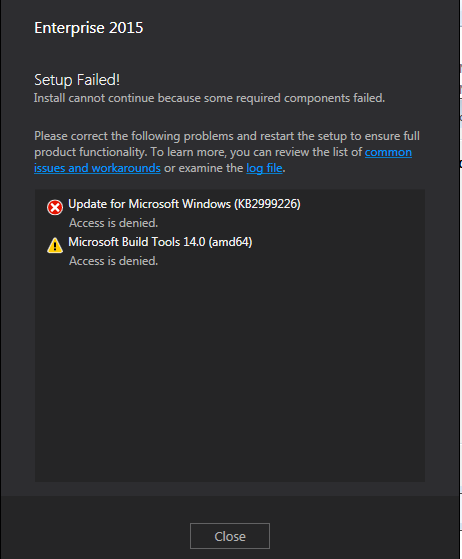
Update for Microsoft Windows (KB2999226) , Access is denied Visual Studio 2015 Enterprise installation

Guys,

while installing new VS 2015 Enterprise edition on Windows 7 machine, I got below error... it was strange and could not find any help from Googling...
finally saw the log file and search with the KB2999226, it was referring Windows6.1-KB2999226-x64.msu may be did not have access. I did that installation manually and hence it started working.

so manually install the file "Windows6.1-KB2999226-x64.msu" from "$VS folder\packages\Patch\x64" .
then run it.

Regards,
Sudhanshu

Thursday, January 31, 2013

GUID Concept, how its created and format

very nicely explained... :)

A customer needed to generate an 8-byte unique value, and their initial idea was to generate a GUID and throw away the second half, keeping the first eight bytes. They wanted to know if this was a good idea.
No, it's not a good idea.
The GUID generation algorithm relies on the fact that it has all 16 bytes to use to establish uniqueness, and if you throw away half of it, you lose the uniqueness. There are multiple GUID generation algorithms, but I'll pick one of them for concreteness, specifically the version described inthis Internet draft.
The first 60 bits of the GUID encode a timestamp, the precise format of which is not important.
The next four bits are always 0001, which identify that this GUID was generated by "algorithm 1". The version field is necessary to ensure that two GUID generation algorithms do not accidentally generate the same GUID. The algorithms are designed so that a particular algorithm doesn't generate the same GUID twice, but without a version field, there would be no way to ensure that some other algorithm wouldn't generate the same GUID by some systematic collision.
The next 14 bits are "emergency uniquifier bits"; we'll look at them later, because they are the ones that fine tune the overall algorithm.
The next two bits are reserved and fixed at 01.
The last 48 bits are the unique address of the computer's network card. If the computer does not have a network card, set the top bit and use a random number generator for the other 47. No valid network card will have the top bit set in its address, so there is no possibility that a GUID generated from a computer without a network card will accidentally collide with a GUID generated from a computer with a network card.
Once you take it apart, the bits of the GUID break down like this:
· 60 bits of timestamp,
· 48 bits of computer identifier,
· 14 bits of uniquifier, and
· six bits are fixed,
for a total of 128 bits.
The goal of this algorithm is to use the combination of time and location ("space-time coordinates" for the relativity geeks out there) as the uniqueness key. However, timekeeping is not perfect, so there's a possibility that, for example, two GUIDs are generated in rapid succession from the same machine, so close to each other in time that the timestamp would be the same. That's where the uniquifier comes in. When time appears to have stood still (if two requests for a GUID are made in rapid succession) or gone backward (if the system clock is set to a new time earlier than what it was), the uniquifier is incremented so that GUIDs generated from the "second time it was five o'clock" don't collide with those generated "the first time it was five o'clock".
Once you see how it all works, it's clear that you can't just throw away part of the GUID since all the parts (well, except for the fixed parts) work together to establish the uniqueness. If you take any of the three parts away, the algorithm falls apart. In particular, keeping just the first eight bytes (64 bits) gives you the timestamp and four constant bits; in other words, all you have is a timestamp, not a GUID.
Since it's just a timestamp, you can have collisions. If two computers generate one of these "truncated GUIDs" at the same time, they will generate the same result. Or if the system clock goes backward in time due to a clock reset, you'll start regenerating GUIDs that you had generated the first time it was that time.
Upon further investigation, the customer really didn't need global uniqueness. The value merely had to be unique among a cluster of a half dozen computers. Once you understand why the GUID generation algorithm works, you can reimplement it on a smaller scale:
· Four bits to encode the computer number,
· 56 bits for the timestamp, and
· four bits as a uniquifier.
We can reduce the number of bits to make the computer unique since the number of computers in the cluster is bounded, and we can reduce the number of bits in the timestamp by assuming that the program won't be in service 200 years from now, or that if it is, the items that were using these unique values are no longer relevant. At 100 nanoseconds per tick, 2^56 ticks will take 228 years to elapse. (Extending the range beyond 228 years is left as an exercise, but it's wasted effort, because you're going to hit the 16-computer limit first!)
You can get away with a four-bit uniquifier by assuming that the clock won't drift more than an hour out of skew (say) and that the clock won't reset more than sixteen times per hour. Since you're running under a controlled environment, you can make this one of the rules for running your computing cluster.

refered from : http://blogs.msdn.com/b/oldnewthing/archive/2008/06/27/8659071.aspx
wiki link : http://en.wikipedia.org/wiki/Globally_unique_identifier
nicely described: http://www.faqs.org/rfcs/rfc4122.html

Monday, April 2, 2012

How to install the updates required for MS CRM 2011, MS CRM 4.0

Sometimes when installing the MS CRM(2011 or 4.0), this needs some updates and its recommened by MS, as attached in the image.

So if the serever is not connected to Internet, then it could not be updated.
Sometimes the installation passed succesfully and installed MS CRM.
But sometimes some weired errors will come.
I will share this in my next blog.

So to get the updates, we can use the config files and the start the installation in the command prompt.
the list of the updates required for Server,srsConnector,email router are as folllows
The following URLS are for x86-based platforms:
The following URLs are for x64-based platforms:
####################################################################
while downloading the above make sure about your version of OS 64 or 32
config file for server and command
save the below file in Server_Config.xml
<CRMSetup>
 <Server>
  <Patch update="true">D://Server_amd64_ENU.msp(downloaded from 1st link)</Patch>
<Server>
</CRMSetup>
command
SetupServer.exe  /CONFIG folderpath\Server_Config.xml

like this the other two can be set up for srsConnector and the email Router
SrsConnector
save the below file in SrsConnector_Config.xml
<CRMSetup>
<srsdataconnector>
<Patch update="true">D://SRS_ENU_amd64.msp(downloaded from 1st link)</Patch>
<srsdataconnector>
</CRMSetup>
command
SetupSrsDataConnector.exe /CONFIG folderpath\SrsConnector_Config.xml

Exchange Router
save the below file in SrsConnector_Config.xml
<CRMSetup>
<Exchange>
<Patch update="true">D://SRS_ENU_amd64.msp(downloaded from 1st link)</Patch>
<Exchange>
</CRMSetup>
command
Setupexchange.exe /CONFIG folderpath\SrsConnector_Config.xml

hope this helps...

thanks,
yes.sudhanshu
ref: http://support.microsoft.com/kb/948917 

Tuesday, March 27, 2012

Exception Details: System.Data.SqlClient.SqlException: Login failed for user

this is an error i got while doing DB connection in C# .
i was wondering if my connectionstring is not correct.. but that was correct...
connection string is "connectionString="Data Source=<serverName>;Database=<DBName>;User ID=<Username>;pwd=<password>;""
what i found is, things should be as follows...
1st of all the user should have teh credentials of SQL Authentication.
and next the DB instance should be of mixed security mode...
if its only Windows Authentication, and you have created the above user in SQL Authentication, then it will throw the same error...
so to make the server in moxed mode login to the server with SQL Admin credential and right click on the server name and click properties...
then got to the "Security" link and select the "SQL Server and Windows Authentication Mode"
then restart the server and try..
this should work...

thanks,
yes.sudhanshu

Unrecognized attribute ‘targetFramework’ when deploying asp.net 4.0

after hosting a site in IIS 7.0 , while accessing any server pages, i got the below error..
"Unrecognized attribute ‘targetFramework’ when deploying asp.net 4.0"

is most likely because of either of 2 reasons:

1. You installed the .net 4.0 bits after IIS was set up, resulting in the wrong version of the .NET framework beeing registered with IIS.

Most often the above results in conflicting versions of the framework, and so the easiest way of solving this is to re-register the .NET extensions with IIS using the aspnet_regiss tool. Make sure you run it from an elevated command prompt and that you use the correct version (in the v4.xx folder that is, not the v2.xx one). On my dev machine this tool is located in:
C:\Windows\Microsoft.NET\Framework64\v4.0.30319
and you run it with the -iru flags like so:
aspnet_regiis.exe -iru
then just restart the IIS if possible.

2. You haven’t set the framework of the IIS application to the correct version of .NET (4.0 that is)

Change this using either the IIS(7.) Manager or the command line. In IIS Manager you select ‘Application Pools’, just double click and you will get a pop up as in the image and change as per the highlighted one in the image.

Hope this helps...

yes.sudhanshu

Monday, March 26, 2012

asp dot net multiline textbox maxlength not working

in asp.net the maxlength attribute does not work, if the textbox is multiline.
<asp:TextBox ID="txtEvent" runat="server" MaxLength="500" TextMode="MultiLine"
                        Width="783px" Height="64px"></asp:TextBox>
if its not multiline the maxlength works properly...
this is a known issue and every body shouts...
so the work around is nothing other than the big Javascript.
so do as follows...

<asp:TextBox ID="txtEvent" runat="server" MaxLength="500" TextMode="MultiLine"
                        Width="783px" Height="64px" onKeyUp="Count(this,500);" onChange="Count(this,500);"></asp:TextBox>


The Javascript is

//check the length of the textbox(multiline)
        function Count(text, long) {
            var maxlength = new Number(long); // Change number to your max length.
            if (text.value.length > maxlength) {
                text.value = text.value.substring(0, maxlength);
                alert(" Maximum " + long + " characters allowed.");
            }
        }

hope this helps...